The General tab, within the INTERACT program settings dialog, allows you to:
o(De)activate the automated update search
oActivate the execution of startup programs
oChange the default File storage location
•Click General - Program - Settings to open the Settings dialog.
•Click on the tab General and change the settings according to your needs.
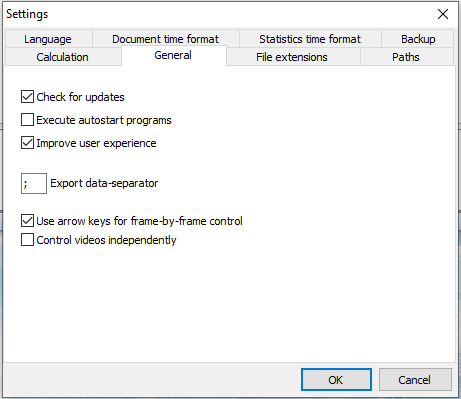
Check for updates
After startup, INTERACT automatically checks if there are any updates available for the currently used license key.
Execute startup applications
If you have one or more IXL Extensions, that you want to run automatically every time you start INTERACT, do this:
•Store the *.ixl extension file(s) in ..\Mangold INTERACT Data\Autostart.
•Select Execute startup programs, to activate the automatic execution of those extensions.
Improve user experience
This option activates a smoother appearance for all application windows and dialogs. On older computers with little capacity, deactivating this option might improve overall performance.
Export Text Separator
Exporting data most often requires a separator between different values. The default separator differs, depending on your system settings. The separator used also influences the way MS Excel handles any exported csv file. If your system settings do not match those expected by MS Excel, or if you require a different separator for your target application, you can alter it here:
oUse a comma "," for USA based Excel installations.
oUse a semi-colon ";" for European based Excel installations.
oUse a "T" for TAB separated export files.
Use Arow Keys for frame-by-frame Control
if this option is selected and the focus is on the multimedia winodw, you can use the ARROW-LEFT and ARROW-RIGTH keys to control your video frame by frame.
The ARROW-UP and ARROW-DOWN keys can be used to play and pause the video.
Control Videos Independently
Use this option with care! Only activate this option if you suffer from choppy audio during regular playback, while you use the audio from any other file as the main, leadingvideo file.