You are responsible for backing up your data.
Total Backup
All data available in the CheckIT app is stored in a single database.
Typically, this database is located here:
C:\Public\Documents\Mangold VideoSyncPro Studio Data\WebRoot\app\prisma\database.db
▪Make a copy of this database.db file for a complete backup.
It is vital to make a backup BEFORE each update of the Mangold CheckIT app.
Session BackUP
Create a backup of your sessions:
▪Log into CheckIT as an Administrator.
▪Switch to the Sessions tab.
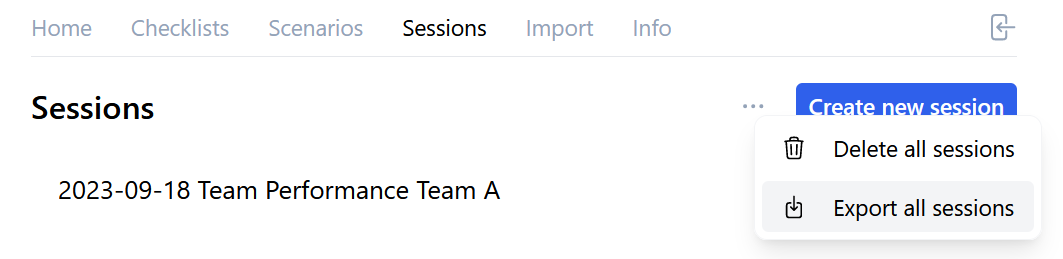
▪Click on the three dots left of the Create new session button.
▪Select Export all sessions.
▪Pick a location and save the *.json file by clicking Save.
Checklist Back up or Template
It is also possible to create a backup of a Checklist itself (all questions and value lists, etc.), but without any answers:
▪Log into CheckIT as an Administrator.
▪Switch to the Checklists tab.
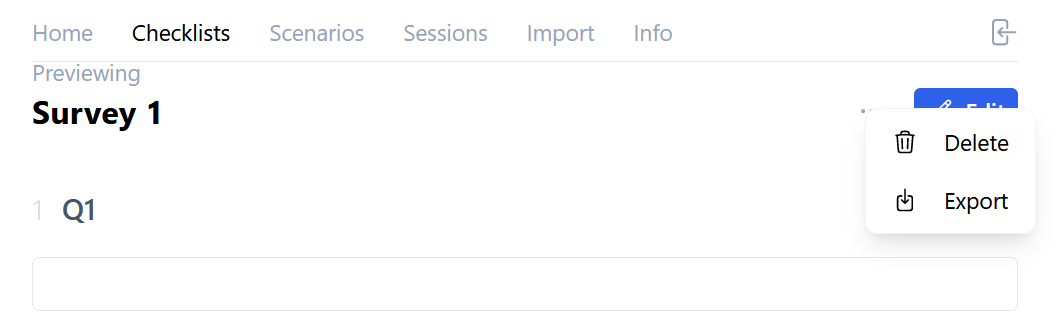
▪Click on the three dots left of the Edit button.
▪Select a location and verify the name of the file to be exported before you click Save.
The exported JSON file can be used as a template and therefore easily be imported as a new Checklist.