IMPORTANT: This topic is for administrators and lab-managers only.
If you received a pre-configured video lab, continue with Design your Session.
VideoSyncPro Studio allows you to create and combine all kind of sources, but not all combinations can be recorded in-sync accurately. You need to thoroughly test any change in setup before you start making your actual recordings.
IMPORTANT: For each Camera Source, the internal mic/audio is used per default. To add audio from another source, you need to created a separate VSP-audio-source for that AND link it to the Camera source using the External Audio option.
The following steps are only required if your video lab contains devices that are NOT Axis IP-cameras or whenever new network sources become available.
▪Select the command Edit common sources, from the Menu available in the upper right corner  .
.
The Available Audio/Video Sources dialog appears:
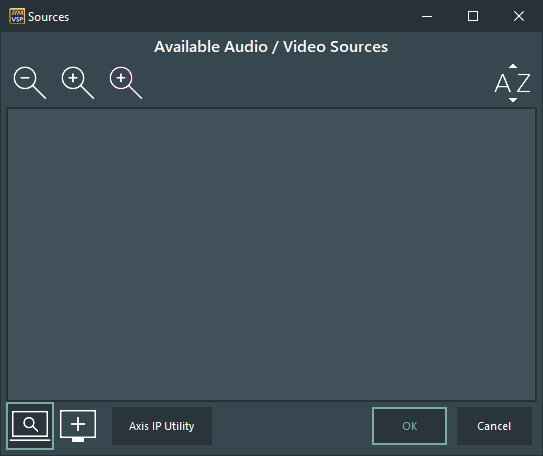
▪Click  Add Source to manually add a new source.
▪Select the applicable Source Type from the list and confirm:
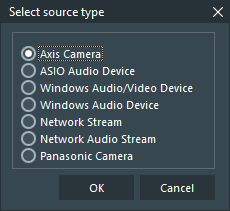
Details about the different source types can be found in those topics:
oAxis Device - Creates a source that uses the Axis Media Control component for recording. This is the default setup for all Axis IP Camera labs because it requires less computer recourses for recording.
oWindows Video Device - Creates a source for a locally attached video device, like a WebCam.
oWindows Audio Device - Creates a source for a physical or logical Windows audio device, which can be used as an external audio input for video sources or used for separate audio recording.
oNetwork Stream - Allows you to insert all kind of HTTP and RSTP video streams, but requires a Core i7, enough RAM and a rather good graphics board.
For recording more than 2 Streams, at least a Nvidia Quadro P2000 is required.
oNetwork Audio Stream - Allows you to capture any network audio source and assign it as external audio to a Network Stream source.
oPanasonic Camera - Allows you to create sources for Panasonic IP Cameras, including PTZ control, if supported by the camera model.
oTesira device - For the integration of Biamp's DSP for integrated networked AV processing, enabling direct control of the audio configuration through predefined configurations on the DSP.