If you want to log e.g. three different Codes (in three different Classes) while pressing a single [key], setup your Code definitions like this:
▪Click Start - Observation - Define Codes  to open the Code definitions dialog.
▪Assign three Codes and Classes to the same [key], like this:
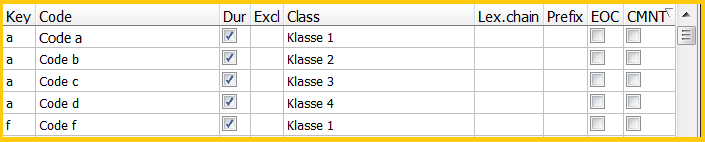
If now [a] is pressed while logging Events, one single Event is logged, containing all four Codes in the corresponding Classes:

This can be useful, to add an aggregated version of the detailed Codes used for logging.
▪Read Identify Chains of Events for a practical implementation.