The colors used for each Code in the Time Line Chart, are stored within the assigned Code Archive.
Every Code and Class, saved in the Code Archive, automatically receives a random color. You can easily re-define any of those random colors to a color of your liking within the Code Archive Editor:
▪Within the Time Line Chart window, click the Code Archive  icon or double-click on the Time Line Chart legend.
or
▪Click Start - Current Document - Properties  and than the Code Archive icon
▪Double-click the color box to be changed.
▪Choose a color from the now appearing dialog:
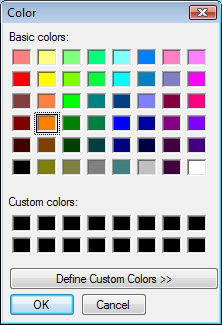
▪Or click 'Define Custom Colors' to create your own specific color.
▪Confirm the Color dialog by clicking 'OK'.
Note: Color changes are stored immediately. You CANNOT undo this by closing the Code Archive editor with Cancel.
Automatically change colors
If you work with a Code Archive created with an older version of INTERACT it is possible that some or all Code and Class colors are black. To save you the trouble of having to assign a color to every single Code and Class, INTERACT offers a useful command:
▪Right-click in the Code Archive editor.
▪Select Random colors for all from the shortcut menu.