Example: Presume you are observing 3 test persons ("A", "B", "C") and you want to collect their Observation Codes in separate columns, per Class AND person. Those Classes can be something like "vocalization", "position", "gaze". This leads to at least 9 Code definition files if we would not use the 'Prefix' column.
In this example we log a new Events whenever the behavior of a test person changes, without focusing on a specific behavior.
There are other approaches to log Events for multiple persons, but this example is good to describe the prefix functionality.
oIf you want to concentrate on one person at the time and run multiple passes through your video, use the Lexical-coding method.
oIf you need to observe all persons simultaneously, choose the Multiple-objects method.
This is how it works:
Define Codes
•Define a Code definition file containing the Observation Codes like this:
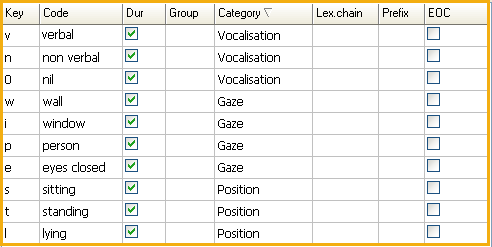
•Define a second Code definition file, containing the names of your test persons.
•Enter the name of the first Code Definition file in the column Lex.chain.

This file is mainly to control the next step: Opening the Codes and activating the right 'Prefix'.
•Enter a fitting Prefix for each test person.
The Prefix behind each name, ensures that the sub-level Classes for each kind of behavior, are automatically labeled per test person.
•Enter a Class for the name of the test person.
This is not a must, but collecting the names for each Event, allows us to sort the Events this way and it might come in handy during statistics.
Log Events
If you log Events, using the coding mode Lexical and enter the Codes as described above, the results look something like this:
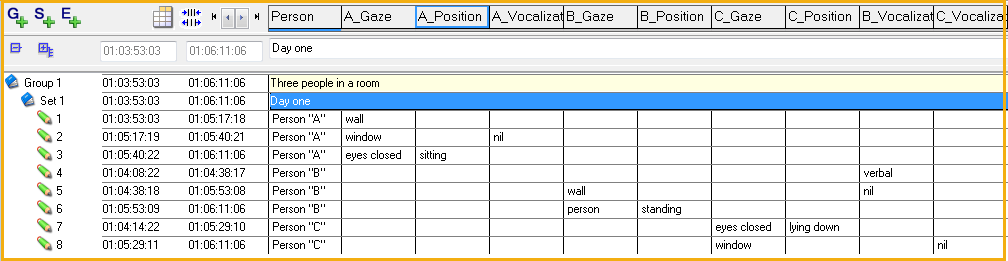
You see that the various Class names have been created, based on the on top-level selected content!
| TIP: | If you have collected your data without the use of the prefix attribute, you end up with a single column for all action types of all persons. In that case, you need to regroup your data for person based statistics (see also the statistics part of Observe animal interaction). To group the data per test person afterward, you can either sort the data based on the Class "Person" (see Sort Events) and split the data into multiple DataSets* or use the Move & Combine Codes routine to create new, combined Codes. Both methods enable you to compare the statistical values per person. |
*) Make a right click on the first Event of the next Person and choose Insert new DataSet between events from the context menu.