Excluding Events based on their duration, from the Time Line Chart and therefore from the statistics, can be very helpful to clean up your statistics.
It means, that you can exclude extremely short or long Codes, without having to filter them using the Cluster data export. It works like this:
▪Open the Time Line Chart, by clinking Analysis - DataSet - Main Statistics  .
.
▪Click on the Duration filter  icon or choose Analysis - Filter events on time from the menu.
The filter Event on duration filter appears:
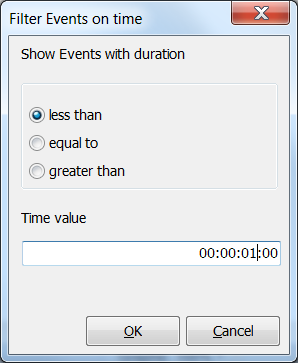
▪Select the constraint that fits the Events you want to exclude.
▪Enter the critical value for the duration, in time code format.
In this example all Events, with a length less than 1 second, are removed from the Time line chart.
▪Confirm with OK.
IMPORTANT: Re-applying the filter with a different value does NOT bring the already removed values back!
To regain a full view of all Events, you will to close the Time line chart window and start anew.
This makes it possible to subsequently apply multiple filters to the same data, allowing you to e.g. exclude all very short as well as all extremely long Events.
| TIP: | In combination with the Contingency analysis (e.g. to create latency Events to measure reactions), this functionality allows you to exclude extremely fast or very slow reactions from the statistics afterwards. |