You can create your variables either manually, for each DataSet or DataGroup, or you can predefine a set of default variables, including possible value lists.
Using default variables is of course the more comfortable way of handling independent variables. Defining value lists helps you to get consistent information and ensures proper value entries.
Define default variables
Because default independent variables are document based items, they are located in the File properties dialog.
▪Click Insert - Variables - Define  .
.
The middle part of this dialog, allows you to define Independent Variables, including value lists to choose from:
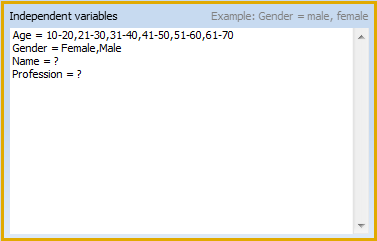
This is a free text field, in which you type the names for your variables, followed by an = and the possible values it can contain.
▪Enter the name of your variable
▪Enter the equal sign (=) after the variable
▪Possible values need to be separated by a comma (,). In this case you can only select one of the predefined values.
▪If the value requires individual entries, enter a question mark (?) instead of the values.