The activated coding mode influences the way INTERACT responds to your commands during the observation.
▪To change the current coding mode, click Start - Observation - Observation settings  , to open the Observation settings dialog.
▪Select the Coding Mode of your choice.
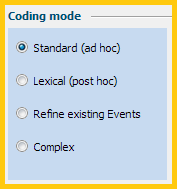
This selection automatically activates all default coding options for the selected Coding Mode.
▪Change the default settings to optimize your individual coding needs.
▪Confirm your settings with OK.
| TIP: | If you do have many different types of Codes, consider splitting those Codes up for multiple passes through the video, to simplify the coding process. For details, read Observation Settings and Coding System Clues. |
Active Coding Mode
The currently active Coding mode is always visible in the status bar, at the bottom of your INTERACT window:

The moment you open your multimedia file(s), it is also shown at the beginning of the Observation Ribbon:
