The 'Select DataSet' dialog, allows you to select just the DataSets you need, either manually, or by making a selection based on the values for your Independent Variables:
 | Manual DataSet selection |
▪Select the DataSets you want to compare in the 'Select DataSet' dialog
(hold down the CTRL key for multiple selection)
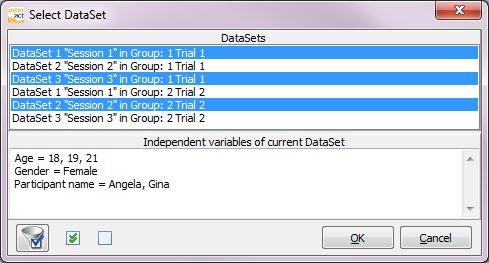
▪To select all DataSets, click the Select all icon, underneath the list with DataSets.
Note: Notice, that (if available) all variables and corresponding values for the currently selected DataSets, are listed in the lower part of the dialog.
| Variable based selection of DataSets |
If you have assigned Independent Variables to your DataSet, you can use the information for selecting the data you want to analyze (this allows you to easily select e.g. all DataSets of 'Female' participants, or all sets for participants between 20 and 30 years of age):
▪Click on the Filter  icon in the lower left corner of the 'Select DataSet' dialog.
The Variables filter dialog appears:
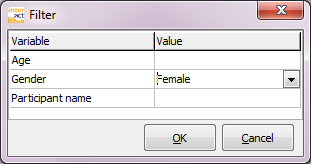
▪Enter or select a value from the drop-down list, for the variable(s) that you are interested in.
Query syntax
Numerical values can be selected by range:
Accepted are the following notations: > (larger), < (smaller), <> (unequal) , 1-5 (range from - to)
Text-based values can only be selected one at the time.
▪Confirm your filter settings with OK.
All DataSets, including the subordinated Events, that fulfill the filter query are now selected.
Once all required DataSets are selected:
▪Confirm your selection with OK.
The now appearing results, only contains the data of the selected Classes and DataSets!