In INTERACT, Independent Variables can be assigned to DataGroups as well as DataSets.
Best praxis is, to predefine all variables in the File properties, as is described in Define Independent Variables. The value assignment, per DataSet, is done with the Independent Variable Editor.
Note: DataGroup variables and their values are automatically inherited by all subordinated DataSets (unless the exact same variable name is used with a different value on DataSet level). We recommend to assign all variables on DataSet level, to ensure that no information is lost, if you merge and rearrange your data during analysis.
This is how you assign independent variable values to a DataGroup or DataSet:
▪Click Insert - Variables - Assign 
or
▪Right-click on the DataGroup or DataSet line.
▪Choose the command Edit Independent Variables from the now appearing context menu.
If no variables have been assigned to any previous element, this Independent Variables dialog appears:
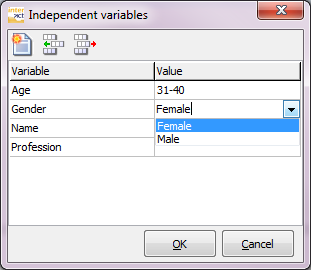
If you have defined default variables, all predefined variables are already listed, if not, the dialog is empty.
To assign a value to any of the listed independent variables:
▪Make a selection from the drop down menu or enter the appropriate value into the Value column.
If no variables are listed:
▪Close the dialog and click Insert - Variables - Define  to setup your independent variable list, as is described in Define Independent Variables.
None Default Independent Variables
In case you need an additional independent variable, that is not listed among the defaults:
▪Click the Add row button to create a new line.
▪Enter the name of the first variable into the empty field within the first column, called Variable (the name of a variable must be identical for each DataSet; the containing value can be used for data selection). Use expressions like Age, Gender, Name, etc.
▪Enter values for this new independent variable.
▪Click (again) on the Add variable icon to insert a new empty line.
▪Continue as before.
▪Click OK if you are finished with the definition.
Values Storage
All independent variables and their values are inserted into the Transcript field of the selected DataGroup or DataSet, like this:
{INDVAR START}
Age=31-40
Gender=Female
Name=Petra
Profession=Head of support
{INDVAR END}
| TIP: | To edit your variables or their values, you can either use the Independent variables editor, or edit the variables right there in the transcript area - make sure you do not remove nor change the first nor the last line, both placed in brackets {}. |