This window enable you to review and visualize Codes as well as transcriptions for the Events that cover the currently played sequences in the video:
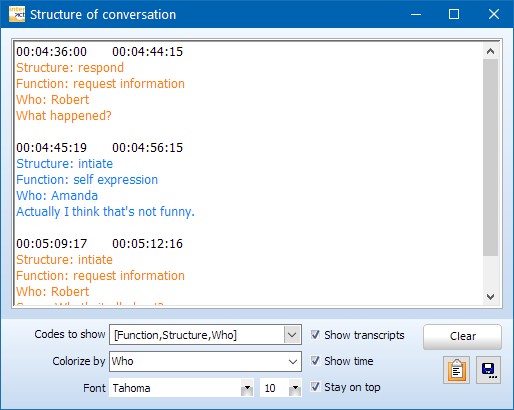
Only the Codes from the current document are displayed.
While the video plays, INTERACT presents a script of all Codes and transcripts that where logged.
▪Click Start - Display - Teleprompter  to open the Teleprompter window.
▪Clear the option Show on top, if you want the Teleprompter to hide behind the main window.
▪To close the Teleprompter window, click the close box in the upper right corner.
Specify Protocol Information
You can decide what information should be listed:
▪Select the Class or Classes, of which you want the Codes to show up in the script, from the Codes to Show list.
▪Clear or select the option Show transcript.
▪Clear of select the option Show Time.
Information is added every time the corresponding sequence is shown.
Format Protocol Content
How readable the protocol content will be, depends on the font type and size as well as the grouped coloring per Code.
To change the font type and/or size of the protocol content:
▪Select the Font type you like best.
▪Select the Font size you prefer.
If you want to visually group information per Code (for example per speaker):
▪Select the Class that holds that information from the Color by list.
Note: The colors used are taken from the Code Archive.
Clear Protocol
To remove currently unwanted information:
▪Click Clear to remove all current entries from the Teleprompter dialog.
If you want to save or use the information listed for other purposes:
▪Click the Save as... icon in the bottom right corner to save the current content of the Teleprompter window into a text file.
▪Click the Copy icon, on the left of the Save as... icon, to copy the current content of the Teleprompter window into the Windows clipboard.
▪Use Edit - Paste within your target application to transfer the content.