If you need to correct some of your time codes, dragging the current time value, displayed in the Timer, onto the time value to be changed, does the trick:
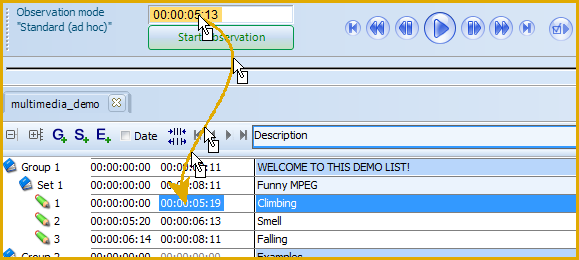
To use this functionality, do as follows:
▪Position the multimedia file(s) to the exact position of your choice.
▪Click on the time value, shown in the Timer display within the Observation Controls.
▪Hold down your mouse key and move your mouse to the required position in your document.
▪Release your mouse, to overwrite the previous time information.
| TIP: | It is also possible, to adjust an onset or offset time value in the currently selected line by using key board shortcuts: CTRL+1 enters the current Timer value as the new Onset time CTRL+2 enter the current Timer value as the new Offset time. |