On this tab you can define the way your time information is displayed as well as the default number of Frames per second in INTERACT (short FPS).
Note: All time information is stored with 100 nanosecond accuracy. You can display your time information either as a time code with frames or as a time value with milliseconds.
▪Go to General - Program - Settings - Document time format.
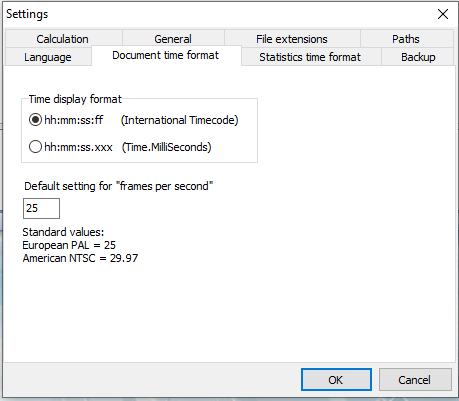
Time Display Format
The time information format, as displayed in the Observation Controls as well as in the data-file, can be changed anytime.
Default FPS value
This FPS value only applies if there is neither a multimedia file available nor a file specific FPS value entered into the file properties of the current document.
The number defined as default FPS value, is used for every new data-file you create - if no multimedia file was open. This is mainly important for live observations, because there is no multimedia file available (yet) in that case.
IMPORTANT: The moment Events are logged, the current video fps value is entered into the file properties of the data-file and this automatically overrules this default setting.
Current FPS versus video FPS
Whenever a video is opened, INTERACT recognizes the fps value of the multimedia file(s) automatically - presuming that the codec in use gives the correct time information. .
•The current video fps is displayed in the upper left corner of the multimedia window.
•The current file fps value is shown in the lower left file window.
If those values do not match, and INTERACT detects logged data in the data-file, you are not able to log new Events within this same data-file. INTERACT instructs you to create a new data-file.