The LogSquare Analyzer program is used for reviewing and analyzing the results of previous recordings.
The LogSquare Analyzer enables you to:
oOpen one or multiple LogSquare Recorder projects (*.lsq files)
oView the recorded screen video(s)
oAnalyze all mouse activities and user entries
oReview the gaze pattern of your participant, if you recorded the user eyes.
oView the content of the log file
oNavigate through the video based on the log file entries of mouse activities, user entries, comments and Codes.
oSet Markers and log observed Events with study specific Codes.
oCreate charts to compare the duration of different tasks or Codes
oCompare the results of multiple recordings of different participants in one chart.
oExport screen videos, either as a whole or as an edited version, showing only the highlights.
LogSquare Project Files
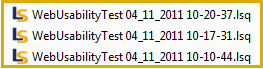
Once you have finished your recordings, you have a collection of *.lsq project files; one for each participant and named like your project name with date and time extensions like this:
For combined analysis of multiple participants, you need to open them all in the LogSquare Analyzer.
•Make sure that those *.lsq files can be accessed from the LogSquare Analyzer computer.
Note: It is also possible to open a LogSquare project file directly in INTERACT, for in-dept behavioral analysis!
LSQ container Details
Those project container files are in fact compressed folders. Inside those packages the recorded information is stored in separate files:
oa log file as *.csv file
othe screencast video
othe user video (if recorded)
It is possible to extract those files from the packages for the use in a third-party application. For proper use with the LogSquare Analyzer, all should be kept in place.