For this example, a user needed to specify rather complex motion sequences that could no be logged with the default coding mode for hierarchical coding systems.
The main reason for not using the Coding-Mode Lexical, was the fact that the dependencies occur with different durations. Reversing the order of the observations would result in too many repetitions of codings of the same information.
Initial Setup
During an interviewing situation, the arm and hand movements of two persons are examined in detail. Not only each movement of both the right and the left arm needs to be logged, also each movement of both the left and the right arm needs to be examined for the following sub-levels:
oStructure
oFocus
oContact
oFunction
One movement with a single arm may consist of one or more of 6 'Structure' Codes.
Once each movement is specified on structure level, each 'Structure' Event may consist of one or more of the seven 'Focus' Codes and so on.
The Challenges
oEach Event must specify the person as well as the arm that performed the movement.
oThe length of the lower level motion specifics have different durations than the corresponding parent sequences.
oLimit the number of Code definition files, while being able to log all possible combinations for each person and each arm.
This leaves us with two alternative approaches:
 | Auto-Fill command - This command allows us to automate the entry of 'standard' information per pass. The setup between each pass requires some discipline, but you do not need to run the restructuring commands afterwards. But because so much information was coded multiple times, some statistics might be tricky. You will need to make clever use of the Combine Codes command and maybe even delete upper-level Events to get it all. |
| Pattern Segmentation - This newer method requires the Events to be logged in a separate Set per participant. Coding is far easier as long as you remember to select the correct DataSet before starting the next pass! For analysis, some restructuring commands are required, but those can be run on big compilations files afterwards by the analyst. This means that only one person needs to understand the impact of the extensive restructuring commands INTERACT has to offer. Advantage: Due to the Pattern Segmentation, there are no overlapping Events, which simplifies getting clean statistics. |
IMPORTANT: Both methods make use of the Coding Mode : Standard
Logging Observations
These best practice examples requires a lot of runs through the video, in order to log all required Codes and Events. Each run focusing on the next level of detail, without the need to re-enter the information from the level before.
We presume that you observe one participant at a time.
Code Definitions
For the first part of the observations, we create 3 simple Code definition files, which will be reused for each participant and arm:
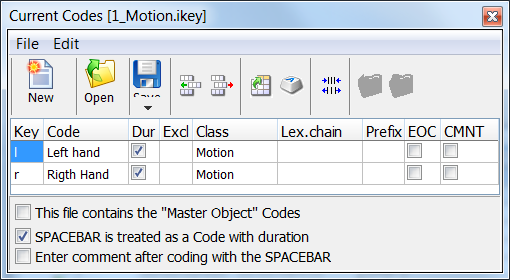
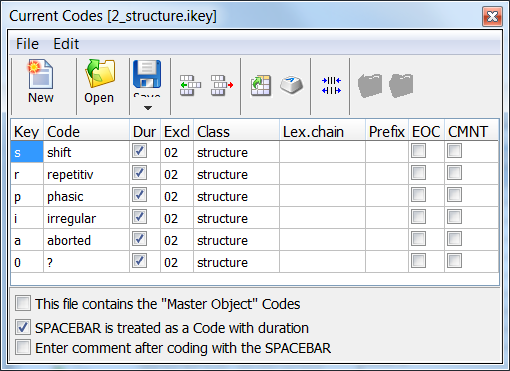
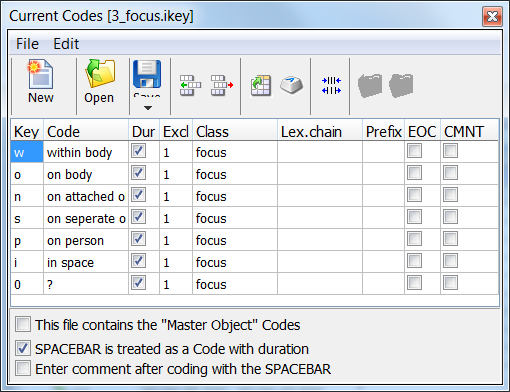
More levels are of course possible.
Note: We presume that you are familiar with the basics of defining Codes and logging Events with the coding mode Standard.