This is one of the statistical overview, available from within the Time Line Chart. It offers you a DataSet based view of various statistic values. You can select the required values in the TLC options dialog.
IMPORTANT: The statistics, exports and analysis routines available within the Time Line Chart, always reflect the data currently visible in the Time Line Chart. If e.g. you are ‘zoomed in' on just a part of your data, only this part is taken into account.
This function gives you statistical information, ordered by DataSet and split by behavioral Code, like shown in the picture below.
To be able to identify which data belongs to which group of originally logged Events, use the description field of each DataSet to enter a short description (as is described in Identify DataSets and Groups).
This description information is also shown in this statistical analysis window.
(In this example the DataSet description is "Patient A", "Patient B" and "Patient C".)
▪Choose Analysis - Statistics per DataSet from the menu within the Time Line Chart window or click  .
.
INTERACT now automatically calculates various statistic figures and display the results in the DataSet statistics window like this:
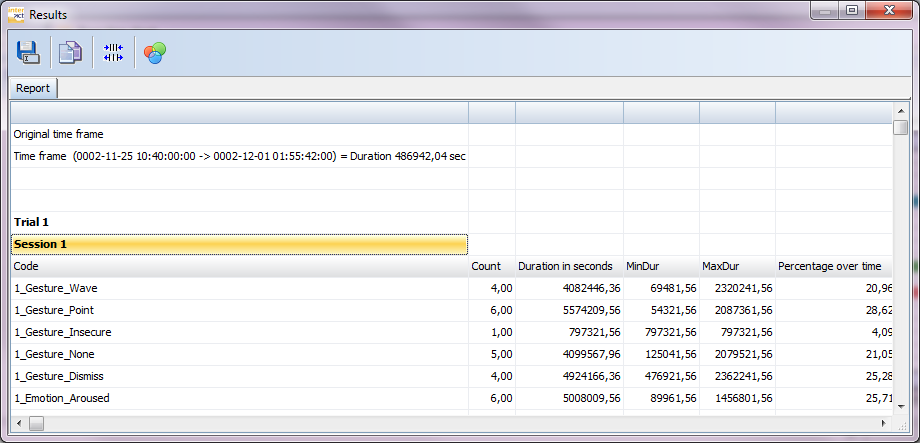
As stated before, you can select the required statistical figures in the TLC options dialog on the tab Statistics. An overview of all available statistical figure types can be found in Column declaration.
Note: The order of the listed Codes, is determined by their order in the assigned Code Archive.
To correctly compare multiple documents that belong to the same study, ensure that they are assigned to the same Code Archive!
Per default INTERACT displays only Codes from the current data-file, if you want to see all Codes that are available within the current Code Archive, you need to change the appropriate setting, as described in the Time Line Chart options - Statistics.
| TIP: | To influence the order of the Codes and Classes in the statistics, read the topic Sort Code Archive contents. |