To broadcast the network license programmed to your USB dongle over the network, you need to locally install the CodeMeter Runtime Kit on the computer with the USB key attached.
Activate License Server
Any computer (Windows, OSX or Linux) within the same network as the clients will do.
▪Make sure the latest version of the CodeMeter RunTime kit installed locally on that computer:
http://www.codemeter.de/us/service/downloads.html
IMPORTANT: Since Version 7 of the CodeMeter Software it is important to activate the Networkserver option DURING INSTALLATION, in order to set the required Firewall Settings: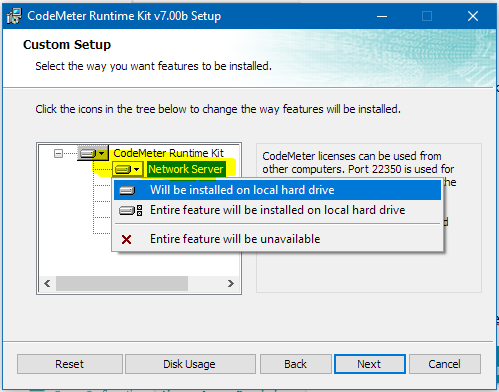
▪Open the CodeMeter Control Center application.
▪Click on the WebAdmin button in the lower right corner.
▪Navigate to Configuration / Server
(http://localhost:22350/configuration/server_access.html)
▪Select Activate in the section the network server.
▪Click Apply to save your changes your changes.
▪Return to the Codemeter Control Center.
▪Select Process - Restart CodeMeter Service to make sure the server is started correctly.
The available licenses can now be accessed over the network.
If the communication is not blocked by any routers or switches, your client should be able to find any free licenses automatically.
Note: Should your clients be located in another subnet or VLAN and are not able to find the license automatically, you need to set up the client computer as well, as described in Network Client Setup.
Restrict License Access
If you want the restrict the usage of the licenses to specific users only:
▪Switch to the License Access Permissions tab.
▪Enter the user names or IP numbers from the users that are allowed to access these licenses over the network into the Client list:
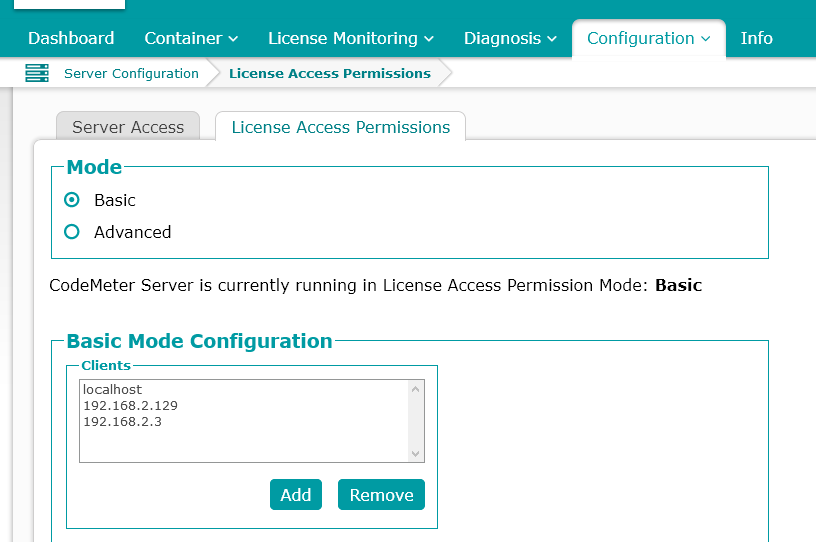
Details and alternative configurations can be found in the CodeMeter help file.
NOTE: Accessing these licenses over a VPN connection works just as well IF the user has sufficient rights when visiting the network over a VPN connection. In case of IP number based access-list: the IP number assigned to the vpn user needs to be in the Client list as well.