To enable communication between moderator and participant, LogSquare offers a build in chat functionality, which allows you to send live messages between participants and moderator.
Observer Chat
The Chat area for the observer is available on the Log tab of the Mangold Remote Observer application.
Note: Without the same functionality activated at the participant side, chatting is of no use at all.
Participant Chat
For chatting, the chat functionality needs to be activated on the participant pc:
▪Click on the little settings icon  located at the Scenario File selection field to open the Scenario settings dialog.
▪Make sure the option Allow user to chat is selected.
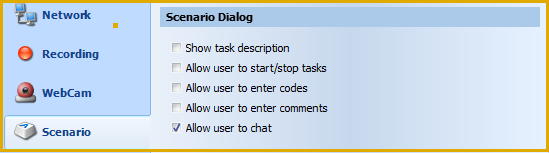
▪Clear the option Use Scenario File on the Start tab of the LogSquare Recorder, if you do not want to use any of the additional scenario functionalities.
The moment you now start a recording session, a small floating window appears on the participant pc, like this:
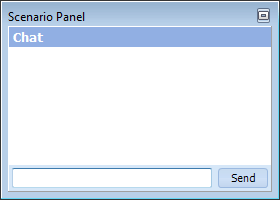
▪Enter your message into the bottom field and click Send to send the message.