The Scenario Panel is part of the LogSquare Recorder.
Depending on the options chosen in the Scenario Settings and the content of the selected Scenario File, the participant receives a floating Scenario Panel, that can look something like this:
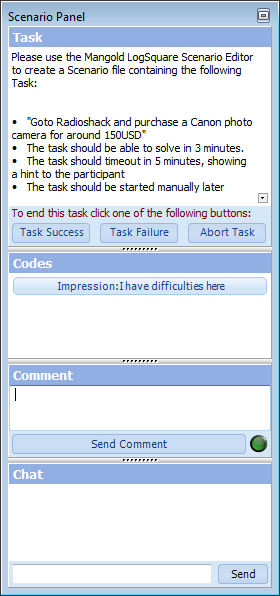
oThe number of areas available depend on the options activated in the program Scenario Settings.
oThis panel size can be resized in all directions.
oThe separator in between the different areas, can be used to adapt the content areas.
oThe little box in the upper right corner enables you to hide the panel contents temporarily, leaving only the floating title bar for minimum interference.
The various functionalities can be combined anyway you need, or disabled completely:
 | Live Chat - Available without a scenario file, but only useful in combination with a Remote Observer. This area can be used to send live messages between the participant and the moderator. |
•Read Live Chat for details.
| Tasks - It is possible to predefine (time limited) tasks. Each task can be described in detail and can include hyper-links. With a time limit you can predefine Ideal Time and Max Time values. Each task can either start automatically or needs to be started manually; either by the moderator or by the participant itself. |
•Read Task Management for details.
| Comments - If you want to enter some live comments during a recording session or maybe even want your participants to enter their personal impressions during the test, LogSquare offers a Comment function. |
•Read Enter Live Comments for details.
| Codes - To enter predefined expressions for easier analysis, LogSquare allows you to predefined codes that can be divided in different classes. Clicking on any of the predefined Codes enters this Code into the log file of the current session, with time information as well as the network name of the LogSquare session that logged that specific Code. |
•Read Log Participant Impressions for details.