As stated before, overall surveys, can easily be implemented. Task specific questions are possible too, though.
Survey only
Simplest solution is to define a task with the option This is a survey task only enabled and all questions assigned to that one task.
The Task name as well as the description itself is presented to the participant, like for a regular task.
This means, that you can use this information to instruct/inform the participant about the up-coming questions. The 'Task-description'-dialog needs to be confirmed before the questions pop-up.
| TIP: | Activate the option Auto Start this Task, to start the survey directly after the previous task is finished. |
Task Specific Questions
If you have several tasks to perform and want some immediate feedback from the participant about each task, it is also possible to assign questions to a regular task.
Those task-questions appear right after the task was finished and you can re-use any question for each task.
In that case, no additional dialog pops-up between finishing the task and the first question!
Independent of the fact that you have 1 or 100 questions to ask on screen, you first need to create the questions before you can assign them!
Assign Questions
You can assign one or more questions to each task. This allows you to reuse questions without messing with the results:
▪Select a task within the Task list.
▪Select as many questions from the Question list to assign them to that task.
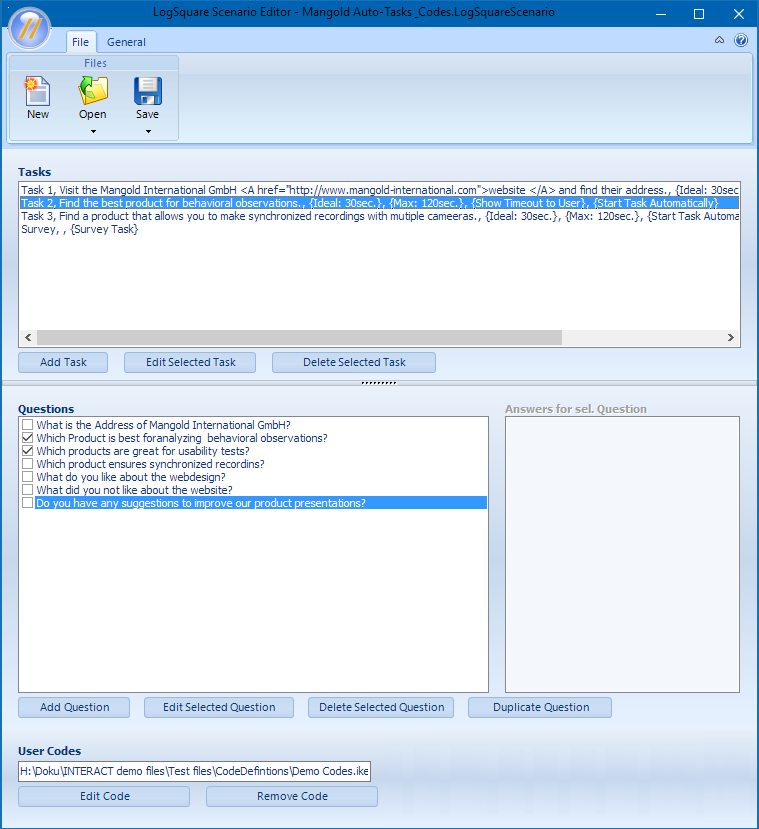
▪Repeat this for every task, if required.
▪Save your changes by saving the *.LogSquareScenarionFile.