The LogSquare Designer enables you to easily create your personal scenario file or to adapt any of the predefined scenario files that came with the installation.
Define and assign your study specific Tasks, Questions and Codes for a structured usability study.
▪Use the Windows Start menu to open the Mangold LogSquare Designer.exe
▪Select File - New to design your own scenario
or
▪Choose File - Open... to open an existing *.LogSquareScenario file.
(You will find some standard questionnaires and training scenario files under ...\Documents\My LogSquare Files\Demo Data)
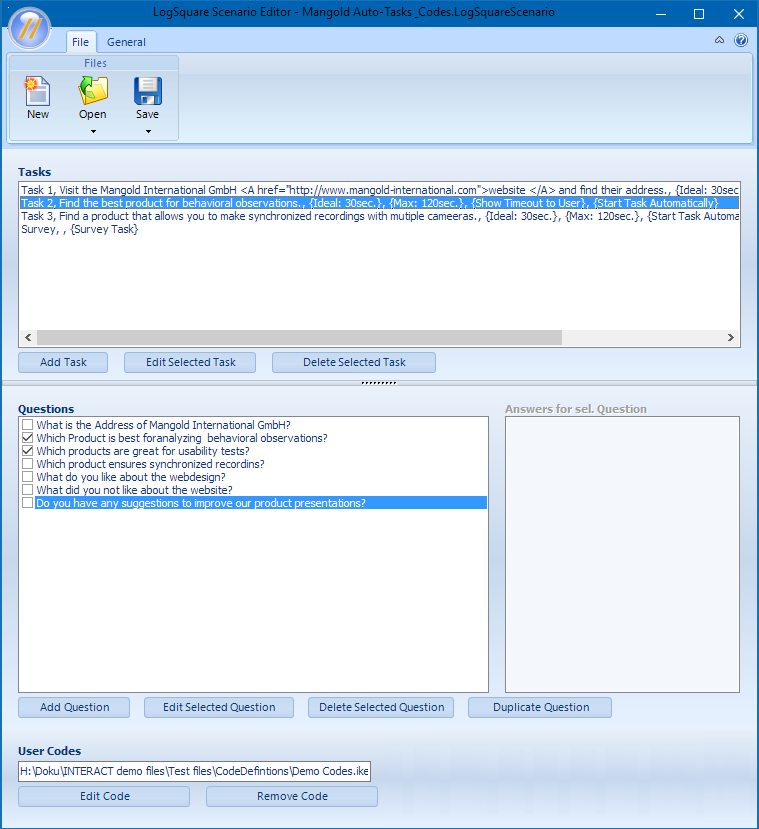
You can define your personal usability test scenario files with great flexibility.
Details on each of the areas can be found in:
Save Scenario File
Once your tasks and questions are setup to your liking, make sure you store the scenario file using a comprehensible name:
▪Select File - Save as... within the tool bar.
▪Name and store the file in the desired location using the default Save as... dialog.
Note: Details on how to implement such a scenario file in your study can be found in the sections LogSquare Scenario Functionality and Task Management.