These settings allow you to change the content of the Scenario Panel during a recording session, and only have an effect if you assigned a Scenario File to your session.
Note: The advantages of conducting structured usability tests with predefined scenarios, is explained in the chapter LogSquare Scenario Functionality.
▪Click on the little settings icon  located at the Scenario File selection field to open the Scenario settings dialog.
OR
▪Click General - Settings - Settings and switch to the Scenario section:
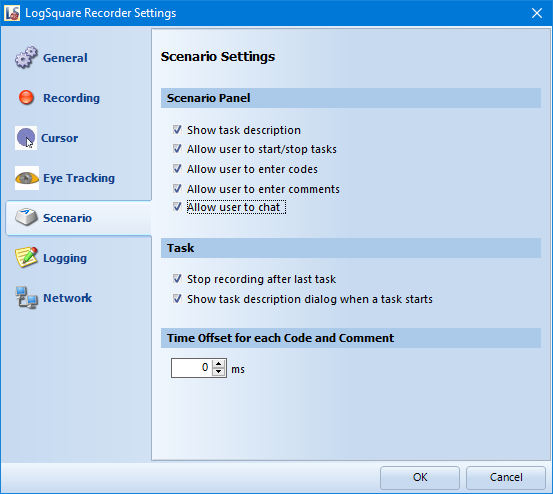
The key features of these settings area are explained in the section LogSquare Scenario Functionality.
Scenario Panel - Those options allow you to specify the functionalities offered by the floating LogSquare Scenario Panel on the participant computer during a recording session.
▪Enable or disable the functionalities to your needs:
✓ Show task description
✓ Allow user to start/stop tasks
✓ Allow user to enter codes
✓ Allow user to enter comments
Task - If you do use the Scenario functionality, those additional options allow you to fine tune the LogSquare behavior during a session.
oStop recording after last task - This option ensures that the recording is properly closed and saved automatically, the moment the last task has been finished by the participant.
oShow new task description dialog - This option presents a dialog containing the description of the next task.
Time Offset - This value is subtracted from each time value that is manually logged.
Entering codes, tasks or comments are all manually logged activities. This Offset value enables you to reduce user reaction latencies or to automatically add a pre-roll to those events. A pre-roll means that the video automatically shows this time just before the selected time, so you can directly see what happened shortly before those entries.
Note: The Time-Offset value does NOT influence the time stamps of automated activities (mouse activities, browser events etc.)